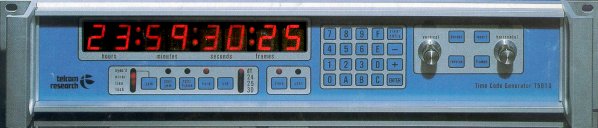


Master LTC Time Code Generator/Reader with High Resolution character inserter, Jam Sync, user bits, external jam, colour framing, continuous jam and parallel input/output.
The T5010 is designed to generate and read the standard serial SMPTE and EBU time and control codes and display this information on a large LED display. The T5010 will also key this information (either as characters with outlines or as plain characters inside a rectangle) into a externally supplied video signal.
Front panel controls and indicators allow selection of the standard to which the time code will be recorded (drop frame, 24, 25 or 30 frames/sec.), activation of color framing, setting time or user data, jam sync operations and stopping and starting the generator. Controls are also provided for character generator positioning, frames suppression, complete character suppression, box and border control and reversing character video. It is also possible to add or subtract from the generator time or user data.
Cont. Jam
Selects an operating mode where at the start of every frame, the generator
time is loaded from the received time code. Decoding and encoding delays
are compensated for so that the code being generated will be a complete
reconstruction (except for user data) of the code being read. If a received
code error condition occurs, the generator will continue to count time
until the error clears.
Color Frame
When pressed, forces the generator time to conform to the SMPTE 4 field
or EBU field coloring number sequence as defined by the external field
identification pulse to indicate color field 1.
Hold
Stops the generator time count from advancing. The code output repeats
the current frame number. When pressed again, the generator resumes counting.
Standard
Used to select one of 4 time code standards.
Time
Selects time data for display on the LED readout video character generator
(when character generator is in the single line mode).
User
Selects user data for display on the LED readout and video character
generator (when character generator is in the single line mode).
0-9
Used to enter the digits 0 through 9 when setting the time or user
data. If the source of the user data is rear panel auxiliary i/o
connector then the only time data may be entered.
A-F
Used to enter the hexadecimal digits A through F when into the user
data when the source of the user data is not rear panel auxiliary i/o connector.
Clear Entry
Erases keyboard entry errors when settting the time or user data.
-
Decreases video character sized when pressed or subtracts a number
entered via the keyboard from either the time or user data. User
data subtractrion is done in hexadecimal arithmetic, time subtraction is
done in the current standard.
+
Increases video character sized when pressed or adds a number entered
via the keyboard to either the time or user data. User data addition
is done in hexadecimal arithmetic, time addition is done in the current
standard.
Enter
Transfers a keyboard entry to the set time or user data. Time
numbers greater than normal are converted before being transferred (ie
99 frames becomes 3 sec. 9 frames at 30 frames/sec).
Vertical
Continuously variable control determines vertical position of characters
in the video display.
Border
Alternate action switch selecting either video characters with a border
or a rectangular box containing unbordered characters.
Reverse
Produces a reverse video effect. With border on, it switches
between white characters with a black border and black characters with
white border. With border off it selects either white characters
in a black box or black characters in a white box.
Insert
This switch enables/disables the insertion of characters in the external
video signal.
Frames
Suppresses the display of frames in the video signal when the time
data is selected. (Shows only hours, minutes and seconds).
Horizontal
Continuously variable control determines horizontal position of characters
in the video display.
Time/User Display
8 digit display .8" high, adjustable brightness.
Sync'd
Indicates that the start of the received code is synchronous within
4 bit times of the start of the generator output code.
Cont. Jam
Flashes to indicate the Continuous Jam mode of operation. (See
description under Controls.)
Color Frame
When lighted, indicates that the generator time conforms to the SMPTE
4 field or EBU 8 field colour numbering sequence using the external colour
field identification pulse to indicated colour field 1.
Hold
LED indicator on the front panel indicating that the generator is in
the HOLD mode.
DF
Indicates that the time code being generated is in the Drop Frame standard.
24
This LED indicates that time code is being generated with a frame count
rate of 24 frames/sec.
25
Indicates that the time code is being generated to the EBU 25 frame
standard.
30
Indicates that the time code being generated is in the SMPTE Non-Drop
Frame standard.
Time
When lighted, indicates that the time data is being displayed.
User
Indicates that the user data is being displayed..
Power
117/235 VAC +/-20%, 47-440 Hz., 20 watts
Size
19" (48.2 cm) rack mount, 3.5" (9cm) high and 13" (33cm) deep.
Weight
8 lbs. (3.63kg)
Environment
Operating temperature range 0 to 600c, relative humidity
0% to 95% (no condensation)
Time Code Input
-30 to +30 dBm, 50% +/- 25% duty cycle, balanced line, 20,000 Ohms
balanced
Time Code Output
Two outputs + 11 dBm. 25 micro second (50 optional) rise time, 600
Ohm balanced
Character Generator
Video input -1 Volt p-p, loop-thru
Video outputs (2) - Unity gain, 75 ohms
Color Framing Input
A.C. coupled 15 Hz. (6.75 PAL) negative pulse indicating field one
of 4 or 8 field sequences. 2 to 8 volts. Active on falling edge.
Parallel In/Out
32 TTL compatible signal lines, 2 ground lines, positive logic.
The Manual in Adobe Acrobat PDF format
Files in Adobe Acrobat PDF format are viewed with Abobe Acrobat Reader.
If you do not already have Adobe Acrobat installed on your computer,
you should download the free Acrobat Reader from Adobe's web site at www.adobe.com.
It is also available from our WEB site here.
Download instructions are available on the Adobe web site.
Once you have downloaded the Acrobat Reader you can view PDF documents in
your web browser if it supports plug-ins or, if it does not support plug-ins,
you can save the file(s) to your hard drive and view them by opening them in Acrobat Reader.
Return to Time Code Page
Return To Telcom Research Main Page