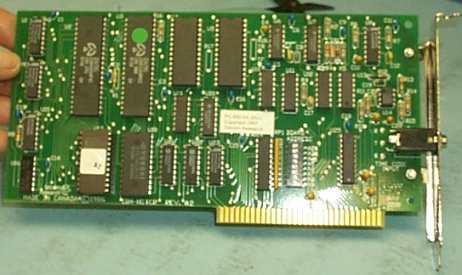


LTC time code reader card for IBM Compatible computers. Fits any half-length expansion slot. Software included in DOS-logging, EDL, programming examples and more. Also included are two Hot-Key programs which add time code/ user bits to either DOS or Windows applications.
The PC600 from Telcom research is a SMPTE/EBU time code reader
expansion card for all IBM PC/XT/AT, PS/2 model 25 , 30 or 50 or compatible
computers. The PC600 is designed to facilitate tape logging and
provide an efficient means of generating edit decision lists with time
code.
The PC600 is ideal as a stand alone product or as a building
block for custom systems using time code.Extensive support is also available
from Telcom Research.
LOG
Tape logging software package featuring single key stroke entry of
time code and/or user data, unlimited scene description capacity and user
definable macros for frequently used words or commands. LOG can also
be used to search through tape logs for selected key words or phrases,
identifying specific takes or scenes immediately with their exact time
code location on the tape. Up to 6 files can be windowed at one time,
allowing text transfers between files.
BUF600
User definable "Hot Key" program which reads current time code from
the T102 and enters time and or user bits into any program with keyboard
input.
PC600DRV
This program uses any free interupt vector in the IBM PC and allows
easy access to time code for user written programs.
DOSTC
Sets the DOS time of day clock form the time code. (May be included
in your Autoexec file)
Also Included
Sample programs and software drivers in BASIC, C, and Assembly Language
for programmers who wish to create custom applications and maximize use
of the PC600.
Time Code Input
-30 to +30dBm, 50%+ 25% duty cycle, 1/10 to 70 times (SMPTE).
Balanced line 4000 Ohms bridging
Connector
Time code XLR
Size
8" x 0.75" x 4.2"
 *NEW* Windows NT, 2000 and XP driver for the PC600
The Manual in Adobe Acrobat PDF format
Files in Adobe Acrobat PDF format are viewed with Abobe Acrobat Reader.
If you do not already have Adobe Acrobat installed on your computer,
you should download the free Acrobat Reader from Adobe's web site at www.adobe.com.
It is also available from our WEB site here.
Download instructions are available on the Adobe web site.
Once you have downloaded the Acrobat Reader you can view PDF documents in
your web browser if it supports plug-ins or, if it does not support plug-ins,
you can save the file(s) to your hard drive and view them by opening them in Acrobat Reader.
Return to Time Code Page
Return To Telcom Research Main Page