
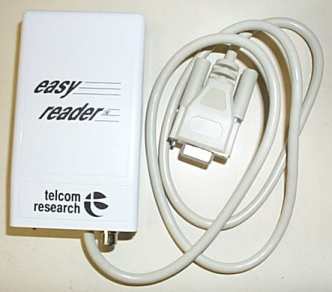

Miniture LTC time code reader with RS-232 interface. Ideal for notebook or laptop computer applications. Operates on a 9V DC battery. Software included in DOS-logging, EDL, programming examples and more. Also included are two HOT-KEY programs which add time code/ user bits to either DOS or Windows applications.
FEATURES
- SMPTE/EBU Longitudinal Time Code Reader
- Operates in 24, 25, 30, Drop and Non Drop Frame
- RCA connector for time code input
- 9 pin connector with 2.5' cable for RS-232 input/output
- Connects to any RS-232 serial port (IBM,MAC,AMIGA, etc)
- 9V battery powered (Approximately 25 hours)
- Weighs 6oz.
SOFTWARE
- EZEFP-Electronic Front Panel, displays time code and selectable settings.Operated by mouse or keyboard.
- EZEDL-Generates Edit Decision List from off line edited tape. Lists created in SMPTE RP 146, CMX, GRASS VALLEY, EECO, or Convergence formats
- EZLOG-Tape Logging with single keystroke entry of time code or user data
- EZBUF-User definable "hot key" program, which reads current time code from the easy reader and enters time and/or user bits into any program with keyboard input. Sample "C" Source Code for integrating the easy reader into your own programs.
The Manual in Adobe Acrobat PDF format
Files in Adobe Acrobat PDF format are viewed with Abobe Acrobat Reader. If you do not already have Adobe Acrobat installed on your computer, you should download the free Acrobat Reader from Adobe's web site at www.adobe.com. It is also available from our WEB site here.
Download instructions are available on the Adobe web site. Once you have downloaded the Acrobat Reader you can view PDF documents in your web browser if it supports plug-ins or, if it does not support plug-ins, you can save the file(s) to your hard drive and view them by opening them in Acrobat Reader.
 *NEW* HotKey Software
Search Our Web Site
Copyright© 2011 Telcom Research
Last modified: October 16, 2011